
zram vs zswap: Compress Linux Memory Before You Buy More RAM
Both compress memory in RAM, but zram replaces your swap device and zswap sits in front of one. On a server with a disk, that difference decides which one you want.
Key takeaways
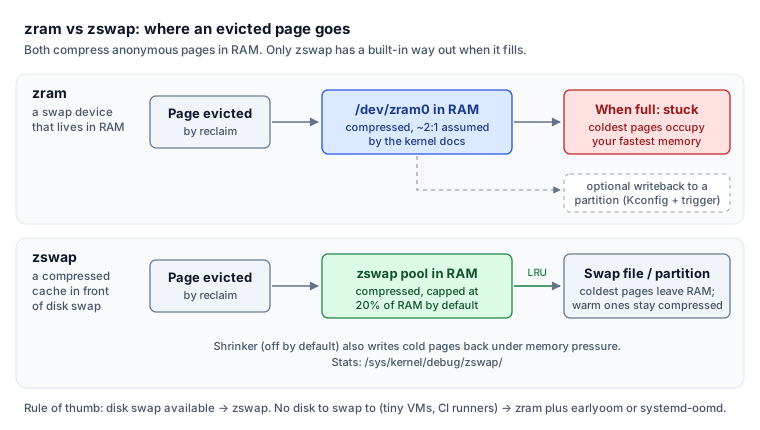
- zram is a compressed swap device that lives entirely in RAM, so it fills up and stays full of cold pages. zswap is a compressed cache in front of a real swap device that writes its oldest pages to disk when the pool fills.
- On machines with disk swap, use zswap; use zram only where there is no disk to swap to.
On this page
Turn on memory compression before you resize a VM for RAM. On a machine with disk swap, use zswap: it compresses pages in RAM and still sends the coldest ones to disk. Use zram only where there is no disk to swap to, such as small VMs and swapless images. Many server images ship with neither switched on.
Verified against
Linux kernel admin-guide pages for zram and zswap, mainline source (7.x), zram-generator man page, Kubernetes 1.34 swap docs and the AL2023 system requirements. Checked November 2026.
On November 19, 2026, "Do not buy RAM, compress it" drew 257 comments on Hacker News by fitting 5.7 GB of browser memory into 1.7 GB of RAM with zram. A day later its author recommended zswap instead. This is why.
Two designs that look alike and are not
zram is a block device. You mkswap and swapon it like any disk, except every page is compressed and kept in RAM; the kernel docs assume about 2:1. Without a backing store, a full device stays full of your coldest pages.
zswap is a cache, not a device. It intercepts pages on their way to a real swap partition or file, compresses them into a pool capped at 20% of RAM by default (max_pool_percent), and when the pool fills it evicts the least recently used compressed pages to the backing disk. Warm pages stay compressed in RAM; cold ones leave.
Chris Down, a Linux kernel memory-management developer, calls the zram failure mode LRU inversion: "your fastest storage tier is clogged with the coldest data, with no way to evict it." zram can write back to a partition, but only with CONFIG_ZRAM_WRITEBACK and a userspace trigger. zswap does it by design, In an Instagram test that moved from no swap to disk swap behind zswap, Down reports roughly 5:1 compression.
| zram | zswap | No compression | |
|---|---|---|---|
| Where compressed pages live | A RAM block device | A RAM pool in front of disk swap | Nowhere, pages go to disk |
| Needs disk swap | No | Yes | Yes, or nothing swaps |
| When full | Stops accepting pages | Writes LRU pages to disk | n/a |
| Default compressor (Kconfig) | lzo-rle | lzo | n/a |
| Best fit | Swapless VMs, small instances | Servers and laptops with swap | Latency-critical hosts with swap off |
What your distro already does
Fedora made swap on zram the default in Fedora 33 and moved to min(ram, 8192) MB in Fedora 34, using zram-generator. Amazon Linux 2023 turns zram swap on only for instances under 800 MB of RAM, such as t4g.nano, and says it does so "at the expense of CPU usage". Ubuntu's Raspberry Pi desktop images use zswap with zstd; we could not confirm a zram or zswap default on standard Ubuntu server images, so check rather than assume. Check what a host is running:
swapon --show
cat /sys/module/zswap/parameters/enabled
zramctl
# If zram is active, compare DATA (original) with COMPR (compressed)
N from the zswap parameter and nothing from zramctl means pages are swapped to disk uncompressed or, with no swap at all, the OOM killer is your only relief valve. Our guide to why the Linux OOM killer fired covers what that looks like.
Turning on zswap on a server
zswap needs a swap device, so create a swap file first if the host has none. Then:
echo 1 | sudo tee /sys/module/zswap/parameters/enabled
echo zstd | sudo tee /sys/module/zswap/parameters/compressor
echo Y | sudo tee /sys/module/zswap/parameters/shrinker_enabled
# Persist with kernel args: zswap.enabled=1 zswap.compressor=zstd zswap.shrinker_enabled=1
sudo grep -r . /sys/kernel/debug/zswap/
The shrinker (off by default) lets zswap push cold compressed pages to disk under memory pressure instead of only when the pool hits its cap. In the debugfs stats, compute the real ratio as stored_pages × 4096 ÷ pool_total_size (bytes), and watch written_back_pages and pool_limit_hit for how often the pool overflows. If writing zstd fails with "No such file or directory", the kernel was built without it; use lz4. Changing the compressor does not recompress pages already stored. On kernel 6.18 and later the zpool parameter is gone, so older guides that tell you to set it to zsmalloc no longer apply.
When zram is the right tool
zram wins where there is no disk you want to swap to: tiny cloud instances, ephemeral CI runners, SD-card devices, and images built without a swap partition. zram-generator makes it a config file:
[zram0]
# zram-size and swap-priority shown at their defaults; zstd is the change
zram-size = min(ram / 2, 4096)
compression-algorithm = zstd
swap-priority = 100
Apply it with sudo systemctl daemon-reload && sudo systemctl restart systemd-zram-setup@zram0.service. Pair it with systemd-oomd or earlyoom: a full zram device plus heavy reclaim can grind a box for minutes before the kernel OOM killer acts (Down cites Cloudflare brownouts of 20 to 30 minutes where it never fired), which is the stall pattern PSI memory pressure is built to catch.
Kubernetes nodes are the hard case
Node swap went GA in Kubernetes 1.34, but the kubelet still refuses to start on a swap-enabled node unless you set failSwapOn: false. The default swapBehavior is NoSwap, so pods cannot swap at all. With LimitedSwap, only Burstable pods swap, each limited to a share proportional to its memory request; Guaranteed and BestEffort pods never do. Down also notes that zram memory is not charged to any cgroup, which undermines the container memory accounting Kubernetes depends on. If you enable swap on nodes, back it with disk and put zswap in front.
Questions people ask
Does zswap or zram wear out my SSD?
zram itself never touches disk unless you configure writeback. zswap still writes to disk, but it keeps warm pages compressed in RAM so only the cold ones go out. In the same Instagram test, Down reports zswap cut disk writes by up to 25% compared with no swap at all, because the compressed pool absorbs hot write churn that would otherwise reach the SSD. Consumer SSDs are rated for hundreds of TBW, so swap writes on a normally loaded host rarely matter.
Which compressor should I pick?
zstd gives the best ratio at modest CPU cost and is the common choice. lz4 is faster and compresses less, which suits latency-sensitive hosts. The kernel's default compressors (lzo-rle for zram, lzo for zswap) are fine but rarely the best; many distros override them, so check /sys/module/zswap/parameters/compressor and zramctl.
The decision, concretely
- Server or laptop with a swap file or partition? Enable zswap with zstd and turn on the shrinker.
- Small VM, CI runner or image with no swap device? Use zram through
zram-generatorand addearlyoomorsystemd-oomd. - Kubernetes node? Keep
NoSwapunless you need it; if you enableLimitedSwap, use disk swap behind zswap, not zram. - Latency-critical host where any page fault costs money? Keep swap off and size RAM for the peak.
The call we'd make
Before approving a bigger instance type for memory, enable zswap on hosts that have swap and measure the ratio in /sys/kernel/debug/zswap/ for a week. Reach for zram only on boxes with nothing to swap to. The caveat: compression buys headroom for cold pages, not for a working set that genuinely outgrew the machine. If written_back_pages climbs steadily and pressure stays high, you need the RAM.
Sources
Cite this article
Kiril Urbonas (2026). zram vs zswap: Compress Linux Memory Before You Buy More RAM. DevOpsNess. https://www.devopsness.com/blog/zram-vs-zswap-linux-memory-compression
[zram vs zswap: Compress Linux Memory Before You Buy More RAM](https://www.devopsness.com/blog/zram-vs-zswap-linux-memory-compression) (Kiril Urbonas, DevOpsNess, 2026-11-20)
More from Linux
Explore more articles in this category

Linux Container Internals: Understanding How Containers Work
A container is a process with extra kernel features applied. Walking through namespaces, cgroups, and the actual mechanics — the level of detail that makes "container weirdness" debuggable.

Shell Scripting Best Practices: Writing Maintainable Scripts
We have a few hundred shell scripts in production. The patterns that make them survive contact with reality, and the ones we've stopped writing.

Systemd Drop-In Overrides for Vendor Services: The Supportable Linux Ops Pattern
A practical systemd drop-in guide built from a real operations problem: vendor unit files kept changing, but the team still needed consistent restart, environment, and logging behavior.
You might have missed
Evergreen posts worth revisiting.


