
What Is an Agent Harness? The Part Around the Model
The model picks the next action. The harness decides what it sees, what it may touch, and when it stops. In production, the harness is where most agent failures live.
Key takeaways
- An agent harness is the software around a language model that turns it into an agent.
- It runs the loop, executes tools, manages the context window, enforces permissions and fires hooks.
- The same model behaves very differently in different harnesses, so treat the harness as infrastructure you configure, version and audit.
On this page
An agent harness is everything around the model: the loop that calls it, the tools it can run, the context it sees, the permissions that stop it and the hooks that watch it. The model chooses the next step. The harness decides whether that step happens. When a production agent misbehaves, the cause is usually in the harness.
Verified against
Claude Agent SDK overview, Claude Code hooks, permissions and headless docs (Claude Code 2.1), Anthropic's engineering post on long-running agent harnesses, and the Terminal-Bench 4.1 leaderboard. Checked November 2026.
Same model, different harness, different agent
A model API returns text, including requests to call a tool. It runs nothing. The harness parses the tool call, executes it, feeds the result back and decides when to stop.
Anthropic describes its Claude Agent SDK as "a general-purpose agent harness", and its docs say the SDK gives you "the same tools, agent loop, and context management that power Claude Code." In Anthropic's own long-running-agent experiments, the fix for agents that declared victory early was not a new model. It was harness work: an initializer prompt for the first context window, a feature list in a JSON file, progress notes, and git commits as checkpoints.
Benchmarks make the point too. The Terminal-Bench 4.1 leaderboard lists every score as a model plus an agent, because the pair is what got measured.
The seven parts every harness has
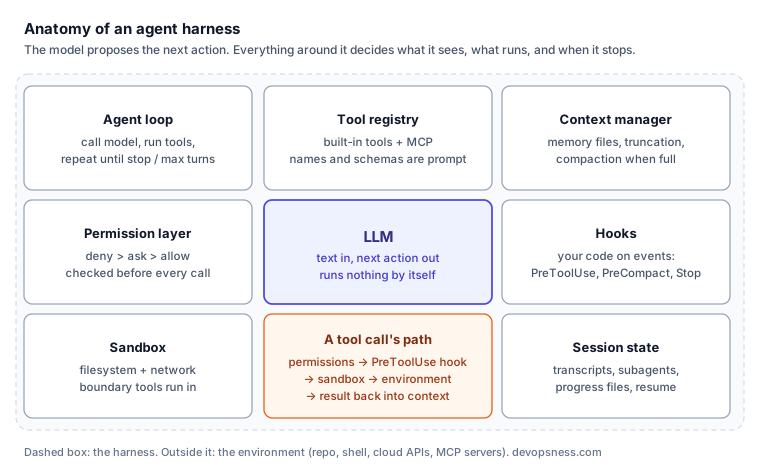
- The loop. Call the model, run the requested tools, append results, repeat until the model stops or a turn limit hits. The whole loop fits in 50 lines, as our guide to building AI agents shows.
- The tool registry. Built-in tools (read, edit, shell, fetch) plus anything exposed over MCP.
- The context manager. Decides what stays in the window: system prompt, project memory files, truncated tool output, and compaction when the window fills.
- The permission layer. Allow, ask and deny rules evaluated before every tool call.
- The sandbox. The filesystem and network boundary the tools actually run inside. Permissions say what the agent may ask for; the sandbox limits what a mistake can reach.
- Hooks. Your code, run on lifecycle events. Claude Code currently documents 33 of them, from
SessionStarttoPreToolUse,PreCompactandStop. - Session state. Transcripts, resumable sessions, subagents with their own clean context, and files the agent writes for its future self.
Context is the part that fails first
Long tasks break on context before reasoning. A 40,000-line test log or a dozen large diffs push the original instructions out of the window or into a summary. Compaction keeps the session alive but loses detail; Anthropic's harness post says plainly that "compaction isn't sufficient" for multi-hour work.
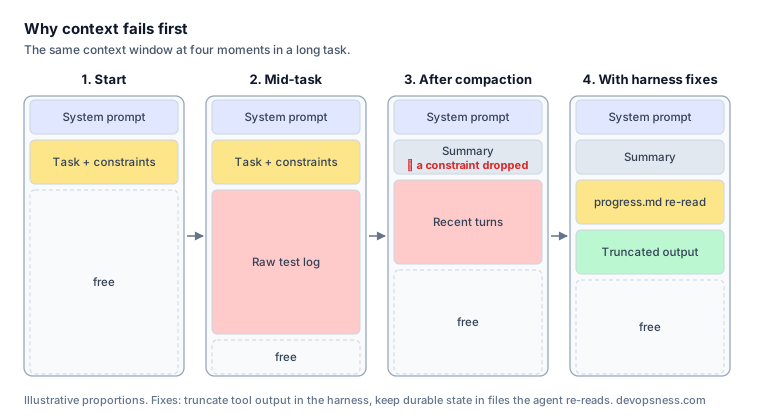
What works is structural. Truncate tool output at the harness, not in the prompt. Push large searches into a subagent so only its conclusion returns. Keep durable state in files (a task list, a progress log) that the agent re-reads after compaction instead of trusting its summary.
Permissions and hooks are your policy layer
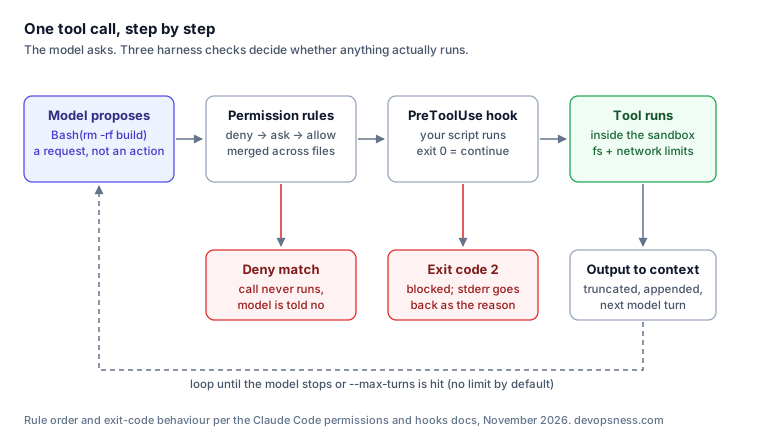
In Claude Code, deny rules win over ask rules, which win over allow rules, and lists merge across user, project and managed settings files. A project-level .claude/settings.json can therefore ship a baseline every developer and CI job inherits:
{
  "permissions": {
    "allow": ["Bash(npm run lint)", "Bash(npm run test *)"],
    "deny": ["Read(./.env)", "Read(./.env.*)", "Bash(git push *)"]
  },
  "hooks": {
    "PreToolUse": [
      {
        "matcher": "Bash",
        "hooks": [
          { "type": "command", "if": "Bash(rm *)", "command": "${CLAUDE_PROJECT_DIR}/.claude/hooks/block-rm.sh" }
        ]
      }
    ]
  }
}
A PreToolUse hook that exits with code 2 blocks the call, and the model sees the hook's stderr as the denial reason. That makes hooks the right place for rules a pattern cannot express, such as "no terraform apply outside a plan file" or "no writes under infra/prod/". For unattended runs, pin the rest on the command line:
claude -p "Fix the failing unit tests in src/billing" \
    --allowedTools "Read,Edit,Bash(npm run test *)" \
    --max-turns 20 --output-format json
--max-turns has no default limit, so set one. The same principles apply to any harness; our post on agent tool boundaries and confirmations covers the read/write split in detail.
Build, buy, or configure
| Option | You get | You own | Fits when |
|---|---|---|---|
Claude Code CLI (claude -p) | Full harness, settings files, hooks | Config and CI wiring | Coding and ops tasks in a repo |
| Claude Agent SDK | The same harness as a Python or TS library | Your app around it | Embedding an agent in a product |
| Graph frameworks (LangGraph and similar) | State machine, checkpoints | Tools, permissions, sandbox | Fixed multi-step workflows |
| Your own loop | Exactly what you write | Everything | One narrow task, few tools |
Your own loop is fine until you need compaction, permission rules and an audit trail, the parts that take months to get right. For running these CLIs inside pipelines, see AI CLI agents in CI.
Questions people ask
Is an agent harness the same as an agent framework?
Overlapping, not identical. A framework gives you building blocks (graphs, memory classes, tool wrappers) and you assemble the runtime. A harness is the assembled runtime: a working loop with context management, permissions and hooks already wired.
Does the harness matter more than the model?
For a fixed task, a weak harness caps what any model can do: it can drown the model in output, lose instructions to compaction or let it run without a stop condition. Benchmarks report the model and agent together for this reason.
The decision, concretely
- Agent works in a git repo on code or config? Use an existing harness and commit its settings file with the repo.
- Agent ships inside your product? Use an SDK harness rather than writing compaction and permissions yourself.
- Running unattended in CI? Allowlist tools explicitly, set
--max-turns, and run in a container you can throw away. - A safety rule you cannot express as a pattern? Write a
PreToolUsehook and test it like any other code.
The call we'd make
Treat the harness as infrastructure. Check its settings file into the repo, review permission changes like IAM changes, put hard rules in hooks rather than prompts, and log every tool call. Pick the model second. The caveat: a harness cannot rescue a task the model fundamentally cannot do, so run a small eval before you blame the configuration.
Sources
Cite this article
Kiril Urbonas (2026). What Is an Agent Harness? The Part Around the Model. DevOpsNess. https://www.devopsness.com/blog/what-is-an-agent-harness
[What Is an Agent Harness? The Part Around the Model](https://www.devopsness.com/blog/what-is-an-agent-harness) (Kiril Urbonas, DevOpsNess, 2026-11-20)
More from AI
Explore more articles in this category

RAG Chunking Strategies: Fixed, Semantic, and Recursive Compared
Our support bot kept citing half a sentence and missing the answer that sat two lines below. The culprit wasn't the model, it was how we split the docs.

LLM Evals That Actually Predict Production Quality
Most LLM eval suites correlate poorly with what real users experience. The eval patterns that move with prod metrics, and the ones that lie.

Plugin4Shell: A Pinned Plugin Is Not a Verified Plugin
A SHA pin that nobody checks is a label, not a control. Plugin4Shell showed that four major coding agents never checked.
You might have missed
Evergreen posts worth revisiting.


